A focused export tool for WhatsApp Web

WhatsApp Chat Export for WhatsApp Web

Turn a conversation into a readable HTML archive or structured Excel and CSV data. Choose the chat, date range, media setting and export pace before you download.

WAExport is an independent browser extension and is not affiliated with, endorsed by or sponsored by WhatsApp LLC or Meta Platforms, Inc.

WAExport WhatsApp Chat Export extension logo

WAExport

WhatsApp Chat Export

Ready

Choose file format

Select chat

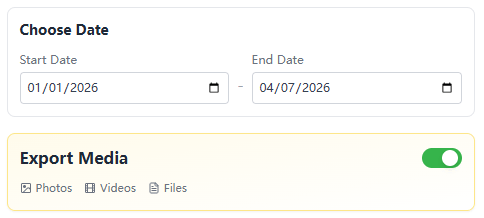
Choose date

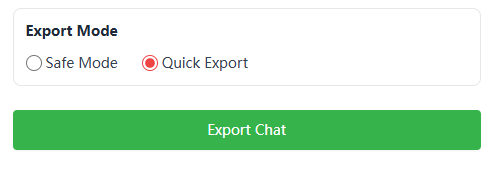
Export mode

Export media

WAExport settings for file format, chat selection, dates, export pace and media.
  • HTML
  • Excel
  • CSV
  • Date range
  • Media option
  • Safe or quick

One export flow, clear choices

Control the file before the export starts

WAExport keeps the decisions in one place, so the downloaded archive matches how you plan to read, store or analyze the conversation.

01 · Output

Choose a format built for what comes next

Use HTML when the conversation needs to remain easy to read. Choose Excel or CSV when the messages need to become structured data.

  • HTML preserves a familiar, chronological reading experience.
  • Excel organizes messages into rows that are easy to filter.
  • CSV provides a portable format for other analysis tools.
HTML
Excel
CSV
A

Project archive

2,486 messages

02 · Scope

Export the conversation and time period you actually need

Select a chat and set a start and end date before processing begins. The archive stays focused instead of collecting unrelated history.

  • Choose the relevant conversation from WhatsApp Web.
  • Use start and end dates to define the archive window.
  • Review the scope before starting the download.

Select chat

All chats

Choose date

Start date

YYYY/MM/DD

End date

YYYY/MM/DD

03 · Control

Balance export pace and media detail

Choose a gentler processing pace or prioritize speed, then decide whether supported photos, videos and files should be included.

Safe Mode: Slows the export pace and increases the interval between processing steps.

Quick Export: Prioritizes speed when you want to complete an export more quickly.

Export mode

Safe Mode

Slows the export pace and increases the interval between processing steps.

Quick Export

Prioritizes speed when you want to complete an export more quickly.

Export media

Photos · Videos · Files

Useful beyond the chat window

Personal archives

Keep important conversations in files that remain easy to open and review.

Service records

Create a local conversation record for follow-up or internal documentation.

Readable HTML

Preserve message order and timestamps in a browser-friendly archive.

Data analysis

Use Excel or CSV to search, sort and analyze structured message data.

How it works

Export a WhatsApp chat in four clear steps

Move from WhatsApp Web to a local archive without copying messages one by one.

  1. 1

    Install WAExport

    Add the extension from the Chrome Web Store and pin it to the browser toolbar.

  2. 2

    Open WhatsApp Web

    Sign in, open WAExport and choose the conversation you want to archive.

  3. 3

    Set the options

    Choose the format, dates, export mode and whether supported media is included.

  4. 4

    Export and review

    Download the archive and open it locally to confirm the result.

1Format
WAExport file format choices for WhatsApp chat export
Choose HTML for reading or Excel and CSV for structured message data.
2Scope
WAExport date range and media options for WhatsApp chat export
Select the chat and dates, then decide whether supported media is needed.
3Export
WAExport chat export mode and export button
Choose an export mode, start the process and review the downloaded file.

Customer reviews

WhatsApp chat export, in users' own words

Users value a WhatsApp chat exporter that stays simple while covering readable archives, structured files and focused export controls.

User rating

5.0/ 5

Based on 13 ratings

Crustacia Robalez

“Super useful and easy to use. Exporting WhatsApp chats is fast and hassle-free.”

  • WhatsApp chat export
  • Simple export workflow

joey

“Fast, reliable and easy to use. Exporting WhatsApp chats to Excel or HTML works perfectly. I also like that the export stays local for better privacy.”

  • Export chat to Excel
  • Export chat to HTML

kai

“Great software—useful, straightforward and convenient for keeping work conversations organized.”

  • Work conversation archive
  • Local chat export

Reviews have been lightly edited for clarity and relevance.

Choose the right method

Native export and WAExport serve different archive needs

Use the WhatsApp mobile feature for an occasional text copy. Use WAExport when you need browser-based format, date and media controls.

Archive needWhatsApp native exportWAExport
Where it runsWhatsApp mobile appChrome with WhatsApp Web
File formatsText archiveHTML, Excel or CSV
Date selectionAvailable chat historySelectable start and end dates
Media choiceWith or without mediaOptional supported media
Best suited forOccasional mobile sharingReadable archives and structured analysis

Understand the data flow

Your exported chat files stay under your control

WAExport creates the selected export in your browser workflow. Read the policies for the exact distinction between locally handled chat content and remote account or product data.

  • Browser-based processing

    Chat content needed for the export is handled in the extension workflow.

  • No chat telemetry

    Product telemetry does not transmit chat text, attachments or exported files.

  • Local output

    You decide where the generated archive is stored, moved or deleted.

  • Independent product

    WAExport is not an official WhatsApp or Meta product.

FAQ

WhatsApp Chat Export questions

Answers about formats, date filters, media, export modes, privacy and restoring a chat.

How do I export a WhatsApp chat?

Install WAExport, open WhatsApp Web, choose a conversation, select HTML, Excel or CSV, set the date, mode and media options, then start the export.

Can I export a WhatsApp chat to HTML, Excel or CSV?

Yes. HTML creates a readable conversation archive, while Excel and CSV provide structured message data for searching, sorting or analysis.

Can photos, videos and voice messages be exported?

WAExport provides an optional media setting for supported attachments. Availability depends on whether the media remains accessible in WhatsApp Web and on the selected mode.

Can I export messages from a specific date range?

Yes. Set a start and end date before exporting so the archive covers the period you need.

What is the difference between Safe Mode and Quick Export?

Safe Mode slows processing and increases intervals between steps. Quick Export prioritizes speed. Safe Mode is a pacing option, not a guarantee against account restrictions.

Can an exported file be imported back into WhatsApp?

No. HTML, Excel, CSV and the official text export are archives for reading or analysis, not WhatsApp restore files.

How is WAExport different from WhatsApp's official export?

The official feature runs in the mobile app. WAExport works with WhatsApp Web and adds selectable HTML, Excel and CSV output plus date and pace controls.

Does WAExport send my chat messages to its servers?

WAExport states that chat text, attachments and exported files are not sent to telemetry services. Review the Privacy Policy for account, activation and product event data.

What if WhatsApp Web changes and export stops working?

Update Chrome and WAExport, reload WhatsApp Web and try again. If the issue remains, use the feedback page and include the extension version and failed step.

WAExport

Turn a WhatsApp conversation into a file you can keep

Choose the chat, format and controls you need, then create a local archive for reading or analysis.