5 Best WhatsApp Chat Export Tools in 2026
Choosing a WhatsApp chat export tool is more complicated than choosing a file format. Some products read an iPhone backup, some require a connected Android or iPhone, some work with database files, and others operate directly alongside WhatsApp Web.
Those differences affect how quickly you can start, which chats are available, whether media can be included, and what you can do with the result. A polished PDF may be useful for printing, while HTML is easier to read in a browser and CSV or JSON is better suited to structured analysis.
This guide looks at five different approaches. Rather than treating every product as interchangeable, it focuses on where the data comes from, the export workflow, available formats, filtering controls, media handling and the type of user each option suits.
What to Look for in a WhatsApp Chat Export Tool
Before choosing WhatsApp export software, consider the complete workflow rather than the longest feature list.
- Data source: Does the tool work with WhatsApp Web, a connected phone, a device backup or a copied database?
- Platform: Can you use it in a browser, or does it require Windows, macOS, Android or iPhone?
- Output: Do you need a readable archive, a spreadsheet, a printable document or structured data for another system?
- Selection controls: Can you choose individual chats, a date range or only part of a backup?
- Media handling: Are photos, videos, audio and documents available, and how are they stored beside the messages?
- Setup: Is it a short browser workflow or a technical process involving backups, encryption keys and command-line options?
- End use: Will you read the conversation, print it, search it, analyze it or move it to another phone?
The right choice depends on which of these requirements matters most in your own archive.
1. WAExport: A Browser-Based Export Workflow
WAExport is designed for people who already use WhatsApp Web in Chrome. It keeps the workflow in the browser instead of asking you to create a full phone backup or connect a mobile device to desktop transfer software.
The extension lets you choose HTML, Excel or CSV, select the available chat you want to archive, set a start and end date, and decide whether supported media should be included. HTML is intended for a readable conversation archive, while Excel and CSV make message data easier to search, filter or process in a spreadsheet workflow.
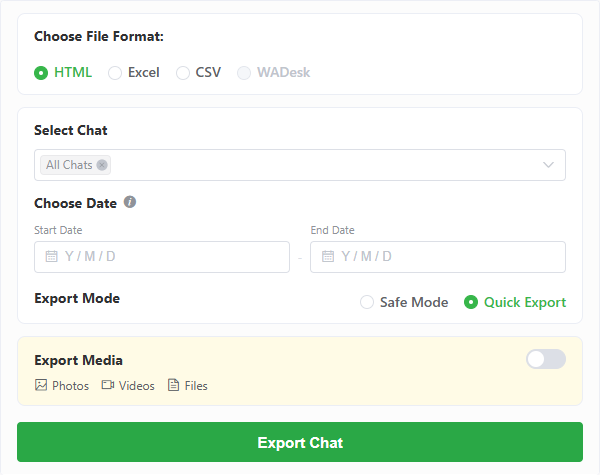
WAExport places format, chat, date, media and processing controls in one browser panel.
WAExport also provides two processing modes. Safe Mode slows the processing pace and increases the interval between export steps. Quick Export prioritizes speed. Safe Mode changes the export pace, but it should not be treated as a guarantee against WhatsApp account restrictions.
Where WAExport fits
WAExport is most relevant when the conversation is accessible in WhatsApp Web and the goal is an independent file for reading or analysis. Its main advantage is the shorter setup: there is no phone backup to prepare and no database file to extract.
The tradeoff is that the export depends on content being available in the current WhatsApp Web session. It is not a phone migration utility, a cloud backup service or a way to restore exported HTML, Excel or CSV files into WhatsApp.
2. iMazing: Detailed iPhone Archives and Printable Exports
iMazing takes a device-centered approach. It runs on Windows or macOS, connects to an iPhone, and reads WhatsApp or WhatsApp Business data from the device or an available backup. The first access may require creating or refreshing a backup before conversations can be viewed.
Its WhatsApp export options include PDF, CSV for use with Excel or other spreadsheet applications, plain text and RSMF. RSMF is aimed at e-discovery and forensic workflows and requires the relevant business-level access. PDF controls can preserve a conversation-style layout and add details such as page numbers or export metadata, making iMazing particularly relevant when chats need to be printed or reviewed as documents.
iMazing can export selected messages or multiple conversations, save attachments separately, search message content and filter the visible data by date range. Photos, videos, audio messages, contacts, locations, links and other attached files can be handled outside the message export.
Where iMazing fits
iMazing is a strong match for iPhone users who need detailed desktop archives, printable PDFs, attachment extraction or evidence-oriented output. It also supports both WhatsApp and WhatsApp Business.
Its workflow is heavier than a WhatsApp Web extension because an iPhone and desktop application are involved. It is therefore less convenient when the only goal is to download a currently visible web conversation as quickly as possible.
3. Tenorshare iCareFone Transfer: Export Within a Phone Migration Toolkit
Tenorshare iCareFone Transfer is primarily a WhatsApp transfer, backup and restore product for Android and iPhone. Its broader purpose is moving WhatsApp or WhatsApp Business data between devices, restoring data from services such as Google Drive or iCloud in supported workflows, and keeping computer backups that can later be viewed or restored.
For chat export, iCareFone Transfer can display backed-up messages and media and export WhatsApp chat history to HTML. Its product workflow also covers photos, videos, audio, documents and other WhatsApp data stored in the backup. This gives it a wider migration focus than a dedicated browser exporter.
Where Tenorshare iCareFone Transfer fits
iCareFone Transfer makes sense when export is only one part of a larger phone change, backup or recovery process. Someone moving from Android to iPhone, restoring a cloud backup to another platform or preserving WhatsApp Business data may value those additional tools.
For a user who only wants a standalone conversation file, the installation, device connection and backup stages can be more work than necessary. If the priority is a WhatsApp chat export tool for a current WhatsApp Web session, a browser workflow removes those phone-backup steps. HTML is the clearly promoted iCareFone chat export format, so spreadsheet-first users should confirm that the available output matches their intended analysis workflow.
4. Dr.Fone WhatsApp Transfer: Backup, Restore and Multi-Format Export
Dr.Fone WhatsApp Transfer is another desktop-oriented option built around connected Android and iPhone devices. Its workflow combines WhatsApp and WhatsApp Business transfer, computer backup, backup preview, selective restore and export.
After a backup is available, Dr.Fone can preview items and export them to PDF, HTML, CSV or Excel. It also handles messages and media such as photos, videos and documents as part of its broader transfer and backup features. This format range makes it flexible when the same archive may need to be read, printed or examined in a spreadsheet.
Where Dr.Fone fits
Dr.Fone is better aligned with users who want a larger phone-management workflow rather than a single browser action. It can be useful when export, device migration and later restoration are related parts of the same task.
The additional scope also means more setup. A phone must be connected and a backup workflow completed before the desktop export becomes relevant. Its product page emphasizes backup-item selection more than a dedicated start-and-end date filter, so users with a strict date-range requirement should check the current export controls before choosing it.
5. WhatsApp Chat Exporter by KnugiHK: An Open-Source Database Parser
KnugiHK's WhatsApp Chat Exporter is fundamentally different from the commercial desktop products above. It is an open-source Python project for parsing WhatsApp chat databases from Android and iOS or iPadOS backups. Android crypt12, crypt14 and crypt15 backup formats are among the supported inputs.
The project can create readable HTML, structured JSON and WhatsApp-style text output. It also offers options for copying or moving media, filtering by an inclusive date, including or excluding selected chats, using custom HTML templates and producing separate files per chat.
Where the open-source exporter fits
This option offers a high level of control for developers, researchers and technical archivists who can obtain the required database, backup, media directory and, where applicable, decryption material. It can also be useful when a reproducible command-line workflow matters more than a guided interface.
The setup is the most demanding in this comparison. Users must be comfortable with Python, command-line flags and WhatsApp backup structures. It is not designed as a one-click extension for someone who only has an active WhatsApp Web session.
Full Comparison of the Five Tools
After looking at each workflow separately, the main differences become clearer:
| Tool | Platform and data source | Main export formats | Date controls | Media | Setup | Best suited to |
|---|---|---|---|---|---|---|
| WAExport | Chrome and WhatsApp Web | HTML, Excel, CSV | Start and end date | Optional supported photos, videos and files | Low | Browser-based readable archives and spreadsheet analysis |
| iMazing | Windows or macOS with an iPhone or backup | PDF, CSV/Excel workflow, Text, RSMF | Date-range filtering | Separate attachment export | Medium | iPhone archives, printing and evidence-oriented output |
| Tenorshare iCareFone Transfer | Windows or macOS with Android, iPhone or backup data | HTML | Not a primary export control | Backed-up photos, videos, audio and documents | Medium to high | Phone transfer, backup and restore with HTML export |
| Dr.Fone WhatsApp Transfer | Windows or macOS with Android, iPhone or backup data | PDF, HTML, CSV, Excel | Backup-item selection; dedicated date range not emphasized | Messages, photos, videos and documents | Medium to high | Combined migration, backup, restore and export |
| KnugiHK WhatsApp Chat Exporter | Python with Android/iOS databases or backups | HTML, JSON, TXT | Inclusive date filter | Copied, moved or separated media | High | Technical, customizable and reproducible exports |
Format names do not tell the whole story. iMazing's CSV is designed to open in spreadsheet applications, while WAExport offers both Excel and CSV choices from WhatsApp Web. Tenorshare focuses on HTML inside a migration toolkit, and KnugiHK prioritizes flexible structured or template-based output for technical users.
How to Choose the Right Option
Choose based on where the chat is available
If the conversation is already accessible in WhatsApp Web, a browser workflow avoids the extra step of preparing a phone backup. If the required history exists only on an iPhone, in a device backup or in an extracted Android database, a desktop or open-source tool may be the better route.
Match the format to the job
Use HTML when readability and message order matter. Choose Excel, CSV or JSON when the messages need to be filtered, searched with structured fields or processed by another tool. PDF is useful for printing and fixed-layout review. Text is portable, but it provides less structure and visual context.
Decide whether export or migration is the real goal
An exported document is not automatically a restorable WhatsApp backup. iCareFone Transfer and Dr.Fone include migration and restore workflows, whereas WAExport creates independent files and KnugiHK parses backup data into external archives. Choose a transfer product if messages must remain usable inside WhatsApp on another phone.
Account for setup and repeat use
A longer initial setup may be reasonable for a one-time legal archive, phone migration or automated technical workflow. For recurring exports from WhatsApp Web, fewer setup steps may be more important than having phone-management features that will not be used.
Conclusion
The best option depends first on the data source and then on the result you need. iMazing is oriented toward detailed iPhone archives and printable output. Tenorshare iCareFone Transfer and Dr.Fone combine export with phone migration, backup and restore. KnugiHK offers the deepest command-line control for users who can work directly with databases and backups.
WAExport is designed for the narrower browser workflow: select an available WhatsApp Web chat, choose a format and date range, control supported media and download an independent archive without preparing a phone backup. If that matches how you work, explore WAExport.
WAExport Is the Best Free WhatsApp Chat Exporter for Chat Backups in 2026
Back up WhatsApp Web chats to local HTML, Excel or CSV files with WAExport. See how this free WhatsApp chat exporter compares with iMazing, iCareFone, Dr.Fone and open-source tools.
How to Export All WhatsApp Chats at Once
Still exporting WhatsApp chats one by one? Use WAExport to select multiple chats or All Chats, set a date range, and save the results to your computer.