How to See Deleted Messages on WhatsApp Web: Chat Export Guide
Wondering how to see deleted messages on WhatsApp Web? While WhatsApp doesn't offer a built-in way to reveal messages deleted for everyone, a few methods may help you access previously saved messages or prevent future data loss.
Official WhatsApp Methods:
- Export Chat: Check WhatsApp chats exported before the messages were deleted.
- Chat Backup: Restore an earlier WhatsApp backup that may contain the deleted messages.
Other Methods:
- WAExport: Save WhatsApp Web conversations before deletion using a WhatsApp chat exporter.
These methods depend on messages being saved before deletion. This guide explains how each option works and how to preserve important conversations.
Can You See Deleted Messages on WhatsApp Web?
WhatsApp provides two options for deleting messages:
- Delete for Everyone: Removes a message from the conversation for participants, typically replacing it with a deletion notice.
- Delete for Me: Removes the message from your own chat view without deleting it from other participants' devices.
When someone uses "Delete for Everyone," WhatsApp Web doesn't provide an official way to reveal the original message.
If you're trying to view deleted WhatsApp messages, the key question is whether those messages were saved before deletion. Earlier exports or backups may contain copies, but WhatsApp Web cannot reveal messages that have already been removed.
However, you may still be able to view a previously saved copy if the message was included in an earlier chat export or backup.
It's important to understand that viewing a saved message is different from recovering a deleted message directly from WhatsApp Web.
How to See Deleted Messages on WhatsApp: Official Methods
WhatsApp offers built-in chat export and backup features on mobile devices. Although neither can directly reveal deleted messages on WhatsApp Web, they may help you access messages saved before deletion.
Method 1: Check Previously Exported WhatsApp Chats
WhatsApp provides an official Export Chat feature on mobile devices, allowing users to save conversation history.
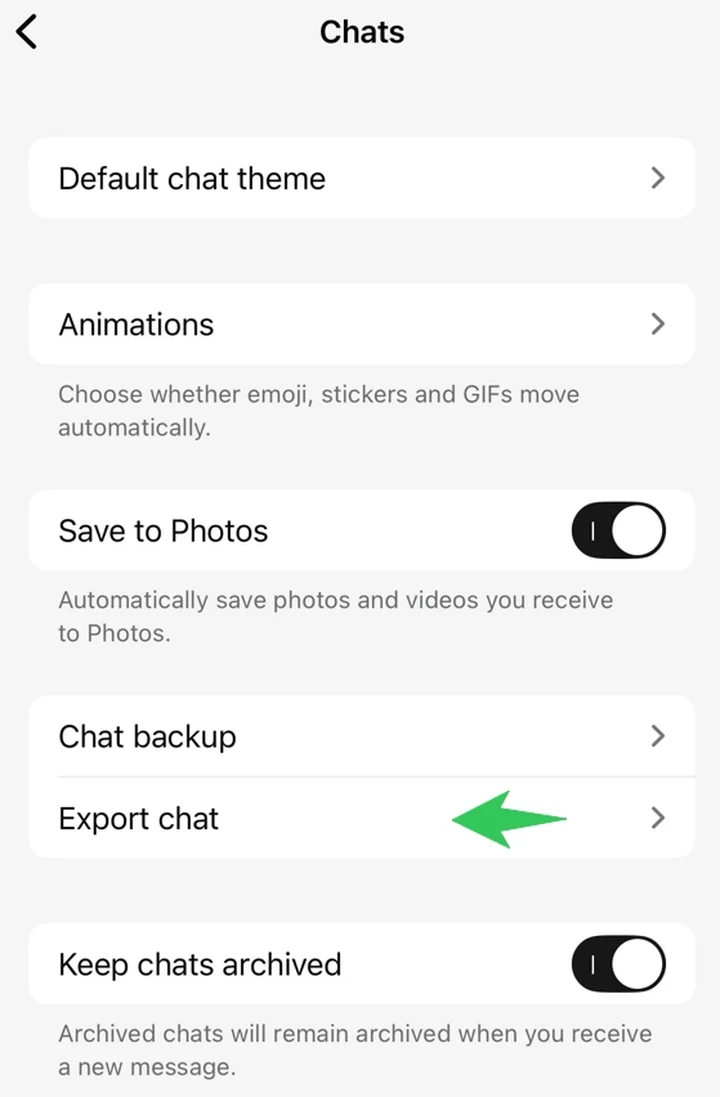
If you exported a conversation before a message was deleted, locate the saved file and check whether the original message is included.
Note: WhatsApp's official export feature is available on mobile devices, not directly through WhatsApp Web. Messages deleted before the export cannot be recovered using this method.
Method 2: Restore an Earlier WhatsApp Backup
WhatsApp supports chat backups through Google Account storage on Android and iCloud on iPhone.
If a backup was created before a message was deleted, it may contain the original conversation.
To check your backup:
- Open WhatsApp on your phone.
- Go to Settings > Chats > Chat Backup.
- Check the date of your available backup.
- If an appropriate backup exists, consider restoring it through WhatsApp's supported mobile restoration process.
Note: Restoring an older backup may replace newer chat history, and the relevant backup must still be available. WhatsApp Web cannot restore backups directly.
How to Export WhatsApp Chats on PC with WAExport
If you use WhatsApp Web regularly, exporting important conversations in advance can help prevent future message loss.
WhatsApp's official Export Chat feature is available on mobile devices. For users who prefer managing conversations directly on a PC, WAExport provides a Chrome extension for exporting accessible WhatsApp Web chats.
Step 1: Open WhatsApp Web on Your PC
Open Google Chrome and visit WhatsApp Web.
Log in to your account and make sure the conversations you want to save are accessible.
Step 2: Install WAExport
Visit the WAExport website and install the Chrome extension.
Once installed, open WhatsApp Web and launch WAExport to access its chat export options.
WAExport allows you to save accessible WhatsApp conversations directly to your computer without manually copying messages.
Step 3: Select Chats and Configure Export Settings
Choose the conversations you want to export. WAExport supports both individual and multiple chat exports.
Configure the following options based on your needs:
- Date Range: Select a specific period or the available conversation history you want to save.
- Export Format: Choose HTML, Excel, or CSV.
- Export Mode: Select Safe Mode or Quick Export.
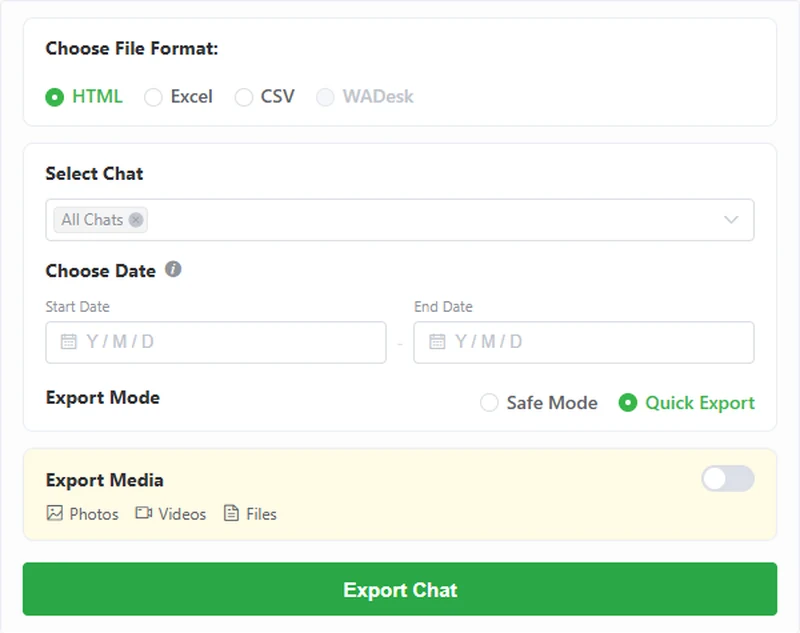
For example, if you regularly communicate with customers through WhatsApp Web, you can export recent conversations to maintain records of important discussions.
Step 4: Export and Save Your WhatsApp Chat History
Start the export process and save the resulting files to your PC.
WAExport supports three export formats:
| Format | Best For |
|---|---|
| HTML | Reading exported chats in a web browser |
| Excel | Organizing and reviewing conversation records |
| CSV | Processing chat data in spreadsheets or other compatible tools |
Media files, including images, videos, voice messages, and documents, can also be exported with Max access.
After exporting, verify that the relevant messages and dates are included, and store the files securely.
Important: WAExport cannot recover messages that have already been deleted. It helps preserve conversation history accessible through WhatsApp Web before information becomes unavailable.
WhatsApp Chat Export vs. WhatsApp Message Recovery: What's the Difference?
Although WhatsApp chat export and WhatsApp message recovery are related, they serve different purposes.
| Feature | WhatsApp Chat Export | WhatsApp Message Recovery |
|---|---|---|
| Purpose | Save accessible chat history | Restore previously backed-up conversations |
| Deleted messages | Only if saved before deletion | Depends on available backups |
| WhatsApp Web | Possible through tools like WAExport | No built-in recovery feature |
| Output | Exported conversation files | Restored WhatsApp conversations |
| Best For | Archiving and recordkeeping | Recovering eligible backed-up messages |
WhatsApp chat export is a preventive solution, while message recovery depends on whether an earlier copy of the deleted information is available.
For users who manage customer communications or important conversations, regular exports can help preserve records that might otherwise become unavailable.
How to Prevent Losing Important WhatsApp Messages
Instead of relying on recovery methods, consider taking a few preventive steps:
- Export important chats regularly: Save valuable conversations before messages are deleted.
- Keep WhatsApp backups enabled: Maintain backups through WhatsApp's official backup feature.
- Save important media: Preserve photos, videos, voice messages, and documents when necessary.
- Organize exported files: Store conversations by contact, project, or date for easier access.
- Protect sensitive information: Keep exported records secure and restrict unauthorized access.
Using both WhatsApp backups and regular chat exports can provide more flexible options for preserving important conversations.
FAQs About Seeing Deleted Messages on WhatsApp
Can I See Messages Deleted for Everyone on WhatsApp Web?
WhatsApp Web doesn't offer a built-in feature to reveal messages deleted for everyone. However, a previously exported conversation or an eligible earlier backup may contain the original message.
Can I View Deleted WhatsApp Messages Without a Backup?
Possibly. If you exported the conversation before deletion, the saved file may still contain the message. Without an earlier saved copy, WhatsApp Web generally cannot retrieve it.
Does WhatsApp Chat Export Include Deleted Messages?
A new export cannot retrieve messages already removed from the accessible conversation. However, an export created before deletion may still contain those messages.
Can WAExport Recover Deleted WhatsApp Messages?
No. WAExport is designed to save accessible WhatsApp Web conversations, not recover deleted messages.
Can I Read Exported WhatsApp Chats on My PC?
Yes. WhatsApp's official exported text files can be opened using a text editor. WAExport also supports HTML files for browser viewing and Excel or CSV files for spreadsheet-based review.
Is WhatsApp Chat Export the Same as WhatsApp Backup?
No. Chat export creates separate files for viewing or archiving, while WhatsApp backup is designed to restore eligible conversation history within WhatsApp.
Exported chat files cannot simply be imported into WhatsApp as restored conversations.
Check What Was Saved, Then Prevent the Next Loss
If you want to view deleted WhatsApp messages, your options depend on whether the messages were saved before deletion. While WhatsApp Web cannot directly recover deleted messages, earlier chat exports or backups may help you access previously saved copies.
To prevent future data loss, use a WhatsApp chat exporter like WAExport to save important conversations to your PC in HTML, Excel, or CSV format. Regular WhatsApp chat export helps preserve your chat history, keeping important messages accessible and organized.
How to Export a WhatsApp Group Chat: Messages, Senders & Media
Need to save a busy WhatsApp group chat? Export messages with WAExport, check who sent them, and keep available media with your conversation files.
How to View Exported WhatsApp Chats and Read Them Easily
Struggling to read exported WhatsApp chats? Learn how to open chat files, view messages and media, and create readable HTML chat archives with WAExport.