WAExport vs iMazing: Which WhatsApp Chat Exporter Fits You in 2026?
WAExport and iMazing can both create external copies of WhatsApp conversations, but they start from different places. WAExport works with chats available in WhatsApp Web, while iMazing connects to an iPhone and reads WhatsApp data from the device or a backup.
That difference affects almost every step after installation. Before choosing a whatsapp chat exporter, it is worth deciding whether your source is a current browser session or an iPhone archive, and whether the result is meant for browser reading, spreadsheet analysis, printing or a more formal records workflow.
This comparison looks at those practical differences without treating either product as the universal answer. The useful choice depends on where your messages are available and what you need to do with them after export.
How We Compare WAExport and iMazing
A feature count alone does not explain how an export will fit into your day-to-day workflow. The comparison below uses seven questions:
- Where does the data come from? WhatsApp Web, a connected iPhone or an existing device backup?
- What needs to be installed? A Chrome extension or a Windows/macOS desktop application?
- What can be selected? Individual chats, multiple conversations, particular messages or a date range?
- Which formats are available? A readable archive, a spreadsheet, plain text or a fixed-layout document?
- How are media and attachments handled? Included with the archive or saved separately?
- How much preparation is required? Can you start from an active web session, or must a device first be paired and backed up?
- What is the final purpose? Reading, analysis, printing, evidence review or broader iPhone data management?
These criteria reveal that WAExport and iMazing overlap in outcome but not in workflow.
WAExport: Export from WhatsApp Web
WAExport is a Chrome extension for conversations that are accessible through WhatsApp Web. After opening the extension, you choose a file format, select the available chat, set an optional start and end date, decide whether supported media should be included, and then choose an export mode.
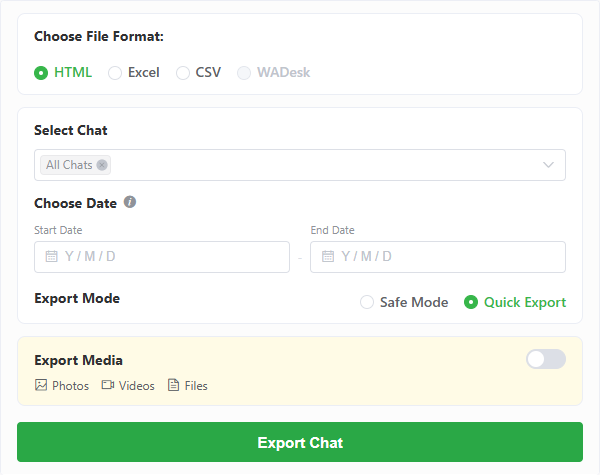
WAExport keeps the format, chat, date, media and processing controls in one browser panel.
The available output choices are:
- HTML for a readable conversation archive that opens in a browser.
- Excel for messages arranged as structured spreadsheet rows.
- CSV for a portable structured file that can be imported into compatible tools.
The media option covers supported photos, videos and files that remain available to the current WhatsApp Web session. Safe Mode slows the processing pace and increases the interval between export steps; Quick Export prioritizes speed. Safe Mode changes the pace of the process but is not a guarantee against account restrictions.
This whatsapp chat exporter is a practical match when the required conversation is already visible in WhatsApp Web and the objective is an independent file. It does not create a restorable WhatsApp backup, migrate chats to another phone or recover content that is unavailable in the web session.
Where WAExport is most useful
- Recurring exports from a computer where WhatsApp Web is already in use.
- Readable HTML archives that do not require a phone backup first.
- Excel or CSV output for filtering, reviewing or processing message records.
- Exports limited to a selected chat and date range.
- Users who want a focused browser workflow instead of a wider device-management suite.
iMazing: Export from an iPhone or Backup
iMazing is a Windows and macOS desktop application with a wider focus on iPhone data access and management. For WhatsApp export, the user connects and pairs an iPhone, selects the device, opens the WhatsApp dataset and allows iMazing to create or access the required backup data.
Once the messages are available in its desktop viewer, iMazing can select messages or conversations, filter by date, search message content and export attachments. Its documented WhatsApp formats include:
- PDF for fixed-layout reading, sharing and printing.
- CSV for importing message data into Excel, Google Sheets, Numbers or another spreadsheet application.
- Text for a portable plain-text record.
- RSMF for supported business, e-discovery and forensic workflows.
iMazing can separately save photos, videos, audio messages, contacts, locations, links and attached documents. Its PDF controls can also include page numbers and export metadata, while supported business functionality adds options intended for more formal records processes.
Where iMazing is most useful
- iPhone conversations that need to be read from a device or an existing backup.
- Printable PDF archives and fixed-layout document review.
- Selecting individual messages or multiple conversations in a desktop viewer.
- Extracting attachments separately from the message document.
- Users who also need broader iPhone backup and data-management tools.
The additional scope brings additional preparation. A desktop program and iPhone data-access process are involved before the conversation can be exported. This can be appropriate for a detailed archive, but it is a different experience from opening a browser extension beside WhatsApp Web.
WAExport vs iMazing: The Essential Differences
1. WhatsApp Web access versus iPhone backup access
WAExport starts with the WhatsApp Web session that is already open in Chrome. This removes the need to connect a phone to the computer, but it also means the export is limited by what WhatsApp Web can currently access and load.
iMazing starts with an iPhone or its backup data. The pairing and backup step takes more preparation, but it can suit users whose required history is stored on the device rather than available in a current web session.
2. Browser extension versus desktop application
WAExport stays inside a Chrome-based workflow. It is narrower in scope and focused on producing external chat files.
iMazing runs as a desktop application on Windows or macOS. WhatsApp export is one part of a broader set of iPhone backup, transfer and data-management capabilities.
3. HTML and Excel versus PDF and text
WAExport emphasizes HTML, Excel and CSV. HTML is convenient for reading a conversation in a browser, while Excel and CSV are useful when structured rows are the desired result.
iMazing emphasizes PDF, CSV, Text and RSMF. PDF is the clearest difference: it supports fixed pages and printing-oriented controls that WAExport does not currently offer. iMazing's CSV can be imported into spreadsheet software, while WAExport also presents a direct Excel choice.
4. Selection and date controls
Both products provide ways to narrow the export. WAExport selects an available chat and accepts start and end dates in its extension panel. iMazing can select messages or conversations, search the loaded history and apply a date-range filter in its desktop viewer.
The important distinction is where those controls operate: WAExport filters content available through WhatsApp Web, while iMazing filters the WhatsApp dataset it has accessed from the iPhone or backup.
5. Media and attachment handling
WAExport can include supported photos, videos and files when the media option is enabled and those items remain accessible in WhatsApp Web.
iMazing documents a separate attachment-export workflow covering photos, videos, audio messages, contacts, locations, links and files. This is useful when the attachments themselves need to be reviewed or stored independently.
6. Export pace and preparation time
WAExport exposes Safe Mode and Quick Export to control processing pace after the browser session is ready. iMazing's time is influenced more by device pairing, backup preparation and the amount of iPhone data that must be accessed before export.
Neither approach should be judged only by the final export click. The setup that happens before it is a major part of the experience.
Full WAExport and iMazing Comparison
| Comparison | WAExport | iMazing |
|---|---|---|
| Primary platform | Chrome with WhatsApp Web | Windows or macOS desktop application |
| Data source | Chats available in the current WhatsApp Web session | Connected iPhone or available iPhone backup data |
| Main formats | HTML, Excel, CSV | PDF, CSV, Text, RSMF |
| Chat selection | Select an available chat | Select messages or one or more conversations |
| Date filtering | Start and end date | Date-range filter in the desktop viewer |
| Media | Optional supported photos, videos and files | Separate export for documented attachment types |
| Setup | Install extension and open WhatsApp Web | Install desktop app, connect/pair iPhone and create or access backup data |
| Processing controls | Safe Mode and Quick Export | Backup and export options rather than browser export-speed modes |
| Strongest use case | Browser-readable archives and spreadsheet analysis | iPhone archives, PDF printing and detailed attachment review |
| Restores exported files to WhatsApp | No | Exported PDF, CSV, Text or RSMF files are external records, not live chat imports |
Which One Should You Choose?
Choose WAExport for a direct browser workflow
WAExport is the more focused option when the conversation can already be opened in WhatsApp Web and you want HTML, Excel or CSV without preparing an iPhone backup. It also makes sense for repeated exports where chat, date, media and processing controls need to remain close together.
Choose iMazing for iPhone-centered archives
iMazing is better aligned with an iPhone backup workflow, especially when PDF output, printing controls, individual message selection or separate attachment extraction matters. Its wider device-management scope can also be valuable if WhatsApp export is only one part of the job.
Choose based on data source before format
CSV is available in both workflows, so the format alone may not decide the choice. First establish whether the authoritative source is WhatsApp Web or an iPhone backup. Then consider whether the result should be a browser archive, spreadsheet, printable PDF or specialist record.
Frequently Asked Questions
What is the main difference between WAExport and iMazing?
WAExport exports chats available through WhatsApp Web in Chrome. iMazing is a Windows/macOS application that accesses WhatsApp data from a connected iPhone or backup. Their supported formats and preparation steps reflect those different data sources.
Does iMazing require an iPhone connection?
iMazing's documented WhatsApp workflow begins by connecting and pairing an iPhone. It then creates or accesses the backup data needed to display the messages. An existing compatible backup may reduce the need to create a new full backup, but the workflow remains iPhone-centered.
Which product exports directly from WhatsApp Web?
WAExport works with WhatsApp Web in Chrome. iMazing does not use the active WhatsApp Web session as its source; it reads the iPhone or available backup data through its desktop application.
Which product supports PDF export?
iMazing documents PDF export with printing and layout options. WAExport currently focuses on HTML, Excel and CSV rather than PDF.
Can both products export media?
Yes, but the workflow differs. WAExport can include supported media available through WhatsApp Web. iMazing can export documented attachment types separately after it has accessed the WhatsApp dataset from the iPhone or backup.
Can exported files be imported back into WhatsApp?
WAExport's HTML, Excel and CSV files are external archives and cannot be restored as live WhatsApp conversations. Likewise, iMazing's exported PDF, CSV, Text and RSMF documents should not be confused with a restorable device backup.
Is a browser extension or an iPhone backup workflow better?
Neither is universally better. A browser extension reduces setup when the required chat is available in WhatsApp Web. An iPhone backup workflow is more appropriate when the required data must be read from the device and the output is intended for printing, attachment review or broader device archiving.
Conclusion
WAExport and iMazing solve different versions of the same archiving problem. iMazing is designed around iPhone data access, detailed desktop review and formats such as PDF. WAExport is designed around the active WhatsApp Web workflow and creates HTML, Excel or CSV files without requiring an iPhone backup first.
If your chats are available in WhatsApp Web and that shorter workflow matches your goal, use the whatsapp chat exporter to see how WAExport works.
How to Export All WhatsApp Chats at Once
Still exporting WhatsApp chats one by one? Use WAExport to select multiple chats or All Chats, set a date range, and save the results to your computer.
How to Export WhatsApp Chat History: WAExport Method and Official Method
Learn how to export WhatsApp chat history with the WAExport Chrome extension to HTML, Excel or CSV, then compare WhatsApp's official Android and iPhone method.