What Does Export Chat Mean on WhatsApp? What Gets Saved and What Doesn’t
What does “Export chat” actually save: a readable copy, a restorable backup or every photo and voice message? These are different results, even though people often call all of them saving a conversation.
Before you download whatsapp chat history, decide what you want to do with the result. Keeping the wording of a discussion, reviewing messages in a spreadsheet and moving a conversation to another phone need different workflows. This guide explains the files, their limits and how to choose without assuming that a successful download preserves everything.
What does Export Chat mean on WhatsApp?
Exporting creates a separate file-based copy of conversation information for use outside WhatsApp. You open the saved files with another application rather than continuing the live conversation inside them. The export reflects the content and range included when the task ran; it is not a continuously updated view of future messages.
New messages do not automatically appear in an older export. Editing downloaded text does not change the original chat, and having a file does not certify that all history or attachments were saved.
“Export chat” describes an action, not a universal file format. The official web workflow described below produces text files. WAExport offers HTML, Excel and CSV for other reading and review needs. Check which method you used before deciding what should be inside the download.
What the official WhatsApp Web export produces
When the export option is available in your WhatsApp Web interface, open one conversation and use its three-dot menu in the upper-right corner. Choose Export chat. The dialog lets you select all messages or a custom date range, with start and end dates, before confirming the export.
This is a single-conversation workflow. Choosing all messages in that dialog refers to the selected chat, not every conversation in the account. It should not be treated as a way to recover deleted messages or retrieve history that is unavailable to the current session. If your interface does not show the entry, do not assume another account or version must show exactly the same controls.
The download is a ZIP archive named for the conversation. Extract it to access both chat.txt and chat.md. You do not choose between TXT and Markdown in the date dialog: the extracted archive contains the two text representations.
This official web export does not include attachments. A photo, video, audio message or document being present in the live chat does not mean its actual file is in the ZIP. Any textual reference to media is not the media itself. This description concerns the web workflow, not the separate export options in the phone apps.
TXT and Markdown: two text files, not two backups
Open chat.txt for straightforward reading
A TXT file is plain text. Open it in a text editor to read or search the exported content without needing a spreadsheet or a specialized chat viewer. Keep the original file unchanged if you plan to make notes or remove sensitive information in a separate copy.
Compare a small section with the conversation, including wording, sequence and any sender or time information provided. A .txt extension identifies the file type, not a fixed layout, encoding or completeness guarantee.
Open chat.md with or without a Markdown viewer
Markdown is also text, with notation that an appropriate viewer can interpret as formatting or structure. A basic text editor shows that notation directly; a Markdown-aware application may display a more formatted reading view. Different viewers can present the same file differently.
The .md file is not an Excel workbook, and formatting does not make it a richer backup. It does not turn a reference to a photo into an included image. Keeping both files can be useful for different readers, but the pair should not be interpreted as two independent captures of the entire chat.
Keep the ZIP and an untouched extracted copy
Before editing or sharing, retain the original ZIP and extract a working copy into a clearly named folder. Record which conversation and date range you selected. If you export again later, use another folder rather than silently mixing two downloads with the same filenames.
A contact's name alone may not distinguish periods or similarly named chats. Check the content before replacing an older archive so the record remains identifiable.
What is saved, and what should you not assume?
Check whether the download contains what you need, not merely whether it exists.
| Item or expectation | How to interpret the official web export |
|---|---|
| One selected conversation | The task targets that chat, not the whole account. |
| Selected period | Use the all-messages or custom-date option as the requested scope; verify the saved content. |
| TXT and Markdown | The extracted ZIP provides chat.txt and chat.md as text files. |
| Photos, videos, audio and documents | Attachments are not included in this web export. |
| Messages arriving afterward | An existing export does not update automatically. |
| A restorable WhatsApp conversation | The files are not a restore package for the app. |
If an important decision depended on a document or voice message, a text-only record may not meet your needs. Identify that gap before deleting anything from the source or handing the archive to another person. A reference to an attachment explains that one existed; it does not preserve its contents.
Export, archive, backup and transfer are different actions
Export gives you files to read or process outside WhatsApp. Archiving a chat inside WhatsApp organizes its place in the app; it is not the same as downloading a local copy. A conversation disappearing from the main chat list is not evidence that it has been saved to your computer.
Backup and restore address bringing supported chat data back into WhatsApp through the applicable backup process. Transfer concerns moving supported conversations between devices. The procedures and requirements depend on the devices and account involved, so an exported text file should not be substituted for those workflows.
Choose by the result you need. For reading a discussion later, an independent export may be enough. For continuing that discussion on a replacement phone, use the appropriate transfer or backup-and-restore process. For analyzing message rows, choose a structured export rather than assuming that renaming a TXT file to .xlsx creates a workbook.
When WAExport is a better fit for the file you need
WAExport provides a separate Chrome-extension workflow for chats accessible through WhatsApp Web. It is useful when you need HTML, Excel or CSV, multiple-chat selection, or supported media options instead of the official web export's TXT and Markdown files.
For a browser-based way to download whatsapp chat history, start with one accessible conversation and a manageable period. Choose HTML for a conversation-style reading archive, or Excel/CSV for rows you can review in compatible spreadsheet software. Multiple chats are processed individually rather than automatically merged into one master workbook.
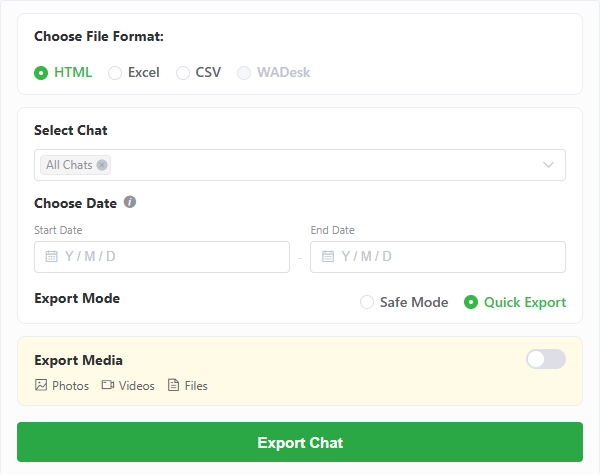
Set the dates and enable supported media only when needed and allowed by your plan. Media export requires Max, and the source attachments must still be accessible. Saved attachment paths or links in a spreadsheet are not embedded pictures or videos. Keep any companion files together when moving the archive.
Date filtering is not an exclusive WAExport advantage: the official web dialog also offers a custom date range. Choose the extension for its output and workflow differences, not for a claim that only an extension can select dates. Safe Mode slows retrieval and adds intervals with the aim of reducing account-ban risk, without guaranteeing freedom from restrictions.
Start the export, choose the save location when prompted and inspect the result. Free allowances and task interruptions can affect how much is saved. Neither a paid plan nor choosing a wider period makes deleted or inaccessible data recoverable.
Check the result before sharing it
Compare the saved file with a short, accessible passage from the selected chat. Confirm that you chose the right conversation and period, that the text opens correctly and that the information you need is present. For a method that exports media, open an actual saved attachment rather than checking only its filename.
Keep sharing limited to people who need the record. Files may contain other participants' information, and exporting does not create permission to publish it. Review a copy before distributing it and retain the original separately. Respect any privacy controls that restrict export; no method described here is a promise to bypass them.
Frequently asked questions
Does Export Chat download every chat in my account?
No. The official web menu starts from one selected conversation. Its all-messages option concerns that conversation's requested range, not all chats in the account.
Why does the ZIP contain both TXT and Markdown?
They provide two text representations for different reading tools. You can use a simple editor for TXT or a Markdown-aware viewer for .md. Neither file includes the web chat's attachments.
Is a downloaded ZIP a WhatsApp backup?
A ZIP is a container, not proof of restore capability. This ZIP contains text exports, not a package that can recreate a live conversation in WhatsApp.
Should I use the official web export or WAExport?
Use the official workflow when a single-chat text copy meets your needs. Consider WAExport when you need HTML, Excel/CSV, multiple-chat selection or supported media export, subject to access and plan limits.
Choose the result before choosing the export method
A useful archive is one you understand: which chat it covers, which dates it includes, how to open it and whether the actual attachments are present. If you need alternative formats and browser-based controls, you can download whatsapp chat history with WAExport. Keep the distinction clear: saving a readable file is not the same as creating a restorable backup.
WAExport vs iMazing: Which WhatsApp Chat Exporter Fits You in 2026?
WAExport or iMazing—which one fits your WhatsApp export workflow? Compare browser access, iPhone backups, formats, media, filtering and setup before choosing.
WhatsApp Backup Stuck or Not Working? 7 Ways to Fix It
WhatsApp backup stuck on preparing or at 99%? Discover 7 ways to fix backup problems on iPhone and Android and save important chats.