How to Export WhatsApp Chat History: WAExport Method and Official Method
Exporting WhatsApp chat history creates a separate copy of a conversation for reading, record keeping or analysis. It is different from a WhatsApp backup because an exported file cannot be restored into the WhatsApp chat interface.
This guide starts with the WAExport WhatsApp Chat Export method for creating HTML, Excel or CSV archives from WhatsApp Web. It then covers WhatsApp's official Android and iPhone export feature so you can choose the method that fits your goal.
Method 1: Export WhatsApp Chat History with WAExport
WAExport is useful when you work in WhatsApp Web and want more control over the archive format, date range, media option and export pace.
- Add WAExport from the Chrome Web Store and pin the extension to the Chrome toolbar.
- Open WhatsApp Web, sign in and wait for the conversation you need to finish loading.
- Open WAExport and select the chat you want to archive.
- Choose HTML, Excel or CSV, set the start and end dates, and decide whether supported photos, videos and files should be included.
- Select Safe Mode or Quick Export, click Export Chat, and check the downloaded result.
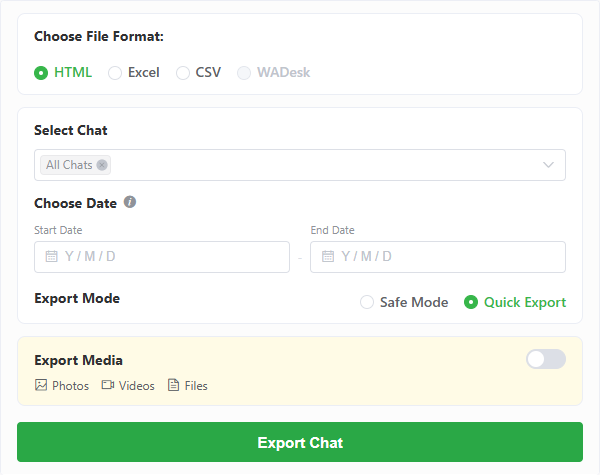
The WAExport export panel brings the file format, chat selection, date filter, media option and processing mode into one workflow.
Safe Mode slows the processing pace and increases the interval between export steps. Quick Export prioritizes speed. These modes change how the export is processed; Safe Mode is not a guarantee against account restrictions.
For a screen-by-screen walkthrough, follow the WhatsApp Chat Export extension guide.
What the WAExport formats are for
- HTML: creates a readable browser archive that keeps messages in order with their timestamps.
- Excel: stores messages as structured rows that are convenient to search, filter and review in a spreadsheet.
- CSV: provides a simple structured file for compatible data tools and custom workflows.
- Supported media: includes accessible photos, videos and files when the media option is enabled and the content remains available in WhatsApp Web.
Keep the exported file and any related media folder together. Moving or deleting only part of an HTML archive can cause images or attachments to stop appearing.
Method 2: Use WhatsApp's Official Export Chat Feature
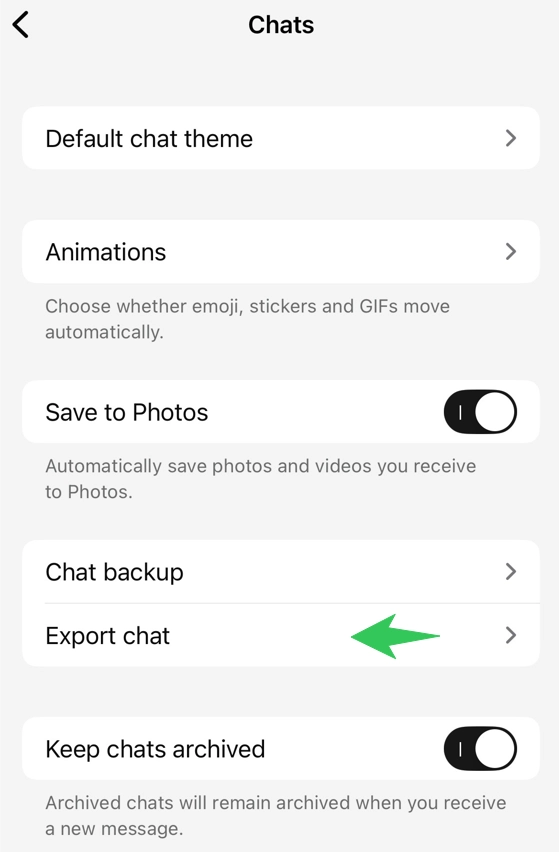
WhatsApp includes an export action inside individual and group conversations. The exact labels can vary slightly by app version and operating system.
Android
- Open WhatsApp and enter the conversation you want to save.
- Open the three-dot menu, choose More, then choose Export chat.
- Select whether the export should include media.
- Choose an available destination, such as email or a file-storage app.
iPhone
- Open the conversation.
- Tap the contact name or group subject at the top.
- Scroll down and choose Export Chat.
- Choose Attach Media or Without Media.
- Save or share the generated archive with an available app.
The official result is intended as a portable text copy for reading. If you include media, the archive is larger and the available sharing destination may impose its own size limit.
WAExport vs. the Official Export Method
| Comparison | WAExport method | Official WhatsApp method |
|---|---|---|
| Platform | WhatsApp Web in Chrome | WhatsApp mobile app |
| Output | HTML, Excel or CSV | Text export with optional media |
| Date range | Select a start and end date | Uses the conversation export provided by the app |
| Media | Optional supported photos, videos and files | Attach media or export without media |
| Best suited to | Readable archives and structured analysis | An occasional mobile conversation copy |
Choose WAExport when you need a WhatsApp Web archive with selectable formats or date controls. Choose the official feature when you need a straightforward text copy from the mobile app.
Exporting Is Not the Same as Transferring or Restoring
An exported text, HTML, Excel or CSV file is not a WhatsApp backup file. You can open it outside WhatsApp, but you cannot import it back so that the messages reappear inside the app.
If your goal is to move conversations to a new phone and continue using them in WhatsApp, follow WhatsApp's official device-transfer or backup-and-restore instructions for your phone combination. Use chat export when the goal is an independent archive.
Which Export Format Should You Choose?
| Goal | Recommended format | Why |
|---|---|---|
| Read a conversation later | HTML | Keeps the archive easy to browse and follow |
| Search or filter message data | Excel | Convenient for spreadsheet workflows |
| Process data with another tool | CSV | Simple, broadly supported structured format |
| Keep an occasional mobile copy | Official text export | Built into the WhatsApp mobile app |
Privacy and Safety Checklist
Before exporting any conversation:
- Make sure you have a legitimate reason to keep and process the conversation.
- Consider whether other participants need to know that the chat is being archived or shared.
- Store exported files in a protected location and delete copies you no longer need.
- Review the extension's privacy policy and requested browser permissions.
- Never treat a third-party tool as an official WhatsApp or Meta product unless the publisher clearly proves that relationship.
WAExport is an independent browser extension and is not affiliated with, endorsed by or sponsored by WhatsApp LLC or Meta Platforms, Inc. Its Privacy Policy explains which chat content is handled locally and which account, activation or product event data may be processed by WAExport services.
Common Export Problems
The Archive Is Missing Older Messages
Allow WhatsApp Web to finish loading the conversation, confirm the selected date range and retry. Older or unavailable content cannot be exported if it is not accessible in the current WhatsApp Web session.
Media Is Missing
Confirm that media export was enabled and that the attachment can still be opened in WhatsApp Web. Keep the downloaded media folder beside the main archive file.
The File Cannot Be Restored into WhatsApp
This is expected. Chat export creates an external archive; it does not create a WhatsApp restore package.
Conclusion
Use WAExport when you want to export WhatsApp chat history from WhatsApp Web to HTML, Excel or CSV with date-range and supported media options. Review the step-by-step export guide before your first archive. Use WhatsApp's official mobile method when you only need a simple text copy, and remember that neither method creates a file that can be imported back as a live conversation.
WAExport vs iMazing: Which WhatsApp Chat Exporter Fits You in 2026?
WAExport or iMazing—which one fits your WhatsApp export workflow? Compare browser access, iPhone backups, formats, media, filtering and setup before choosing.
WhatsApp Web Export Chat Option Missing? How to Download Your Chats
Can't find Export Chat in WhatsApp Web? Learn how WAExport downloads chats to your computer, which formats to choose, and what to check if media is missing.